> ## Documentation Index
> Fetch the complete documentation index at: https://lightdash-docs-many-to-many.mintlify.site/llms.txt
> Use this file to discover all available pages before exploring further.
# Joins reference
> Joins let you connect different models to each other so that you can explore more than one model at the same time in Lightdash and see how different parts of your data relate to each other.
## Adding joins in your models
Joins are defined at the same level as the model parameters in your YAML file.
```yaml
models:
- name: accounts
meta:
primary_key: id
joins:
- join: deals
type: left
sql_on: ${accounts.id} = ${deals.account_id}
fields: [unique_deals, new_deals, won_deals, lost_deals, stage]
relationship: one-to-many
```
When you open Lightdash, the dimensions and metrics from your joined model will appear below the ones in your selected model.
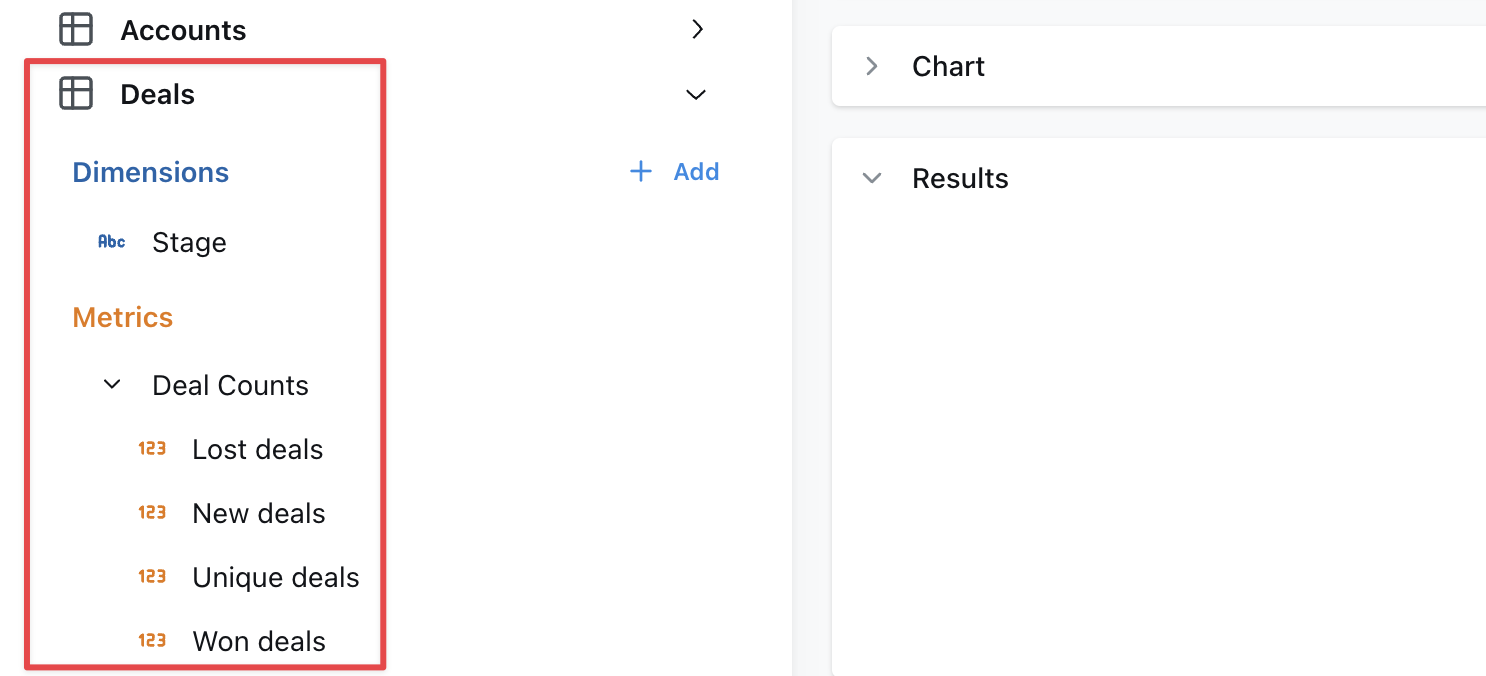
* Omit `fields` to include all metrics and dimensions defined in the joined table.
* When joined fields reference other fields, those other fields must be included.
* The `sql_on` statement can include references to [user attributes](/references/user-attributes) for row-level filtering.
## Rename a joined model
When joining tables, you may want to rename for readability. This can be done with the `label` tag, for example on the `messages` model it makes sense to rename the joined `users` table as "Sender":
```yaml
models:
- name: messages
meta:
joins:
- join: users
label: Sender
sql_on: ${messages.sent_by} = ${users.user_id}
```
## Join the same table multiple times
If you need to join a table multiple times, you can use an `alias` to distinguish between the different tables. A common use case is joining a user table multiple times to another table depending on the type of user. For example this `messages` model has both a sender and a recipient:
```yaml
models:
- name: messages
meta:
joins:
- join: users
alias: sender
sql_on: ${messages.sent_by} = ${sender.user_id}
- join: users
alias: recipient
sql_on: ${messages.sent_to} = ${recipient.user_id}
```
Note the following important differences when using alias in joins:
1. You must reference the fields in the model using the new alias. Notice that the joins above use `${sender.user_id}` rather than `${users.user_id}`.
2. Because of the above, any fields in the base model or joined model that reference any field `${users.*}` will fail to compile. Be careful of aliasing tables that are used in the base model.
3. Joined models are automatically relabelled with the alias but you may also customise this using the `label:` field as above.
## Specify your join type
If you want to specify the type of join to be used in your SQL query, use the `type` field in your YAML configuration file. Set its value to one of the following: `inner`, `left`, `right`, or `full`. This will determine how the tables are joined in your query, aligning with SQL's inner join, left outer join, right outer join, or full outer join respectively.
Here's an example of how to specify a join type:
```yaml
models:
- name: messages
meta:
joins:
- join: users
type: inner
sql_on: ${messages.sent_by} = ${users.user_id}
```
By default, if no `type` is specified, Lightdash will use a `left join`.
Here's a table to help you understand what each join type means and how it translates to SQL:
| Join Type | Generated SQL | Description |
| :-------------- | :--------------- | :-------------------------------------------------------------------------------------------------------------------------------------------------------------- |
| [inner](#inner) | inner join | Returns rows that have matching values in both tables. |
| [left](#left) | left outer join | Returns all rows from the left table, and the matching rows from the right table. Non-matching rows will have NULL for right table's columns. |
| [right](#right) | right outer join | Returns all rows from the right table, and the matching rows from the left table. Non-matching rows will have NULL for left table's columns. |
| [full](#full) | full outer join | Returns all rows when there is a match in either the left or right table records. Non-matching rows will have NULL for columns of the table that lacks a match. |
### inner
An inner join returns rows that have matching values in both tables. For example, if you have a `users` table and a `subscriptions` table, an inner join would return only the users who have a subscription.
Here's an example of how to specify an inner join:
```yaml
models:
- name: users
meta:
joins:
- join: subscriptions
sql_on: ${users.user_id} = ${subscriptions.user_id}
type: inner
```
### left
A left join returns all rows from the left table (i.e. the model where you're adding the `join` to), and the matching rows from the right table (i.e. the model you've specified in `- join:`). Non-matching rows will have `NULL` for right table's columns. For example, if you have a `users` table and a `subscriptions` table, a left join would return all users, and the subscription information for users who have a subscription.
Here's an example of how to specify a left join:
```yaml
models:
- name: users
meta:
joins:
- join: subscriptions
sql_on: ${users.user_id} = ${subscriptions.user_id}
type: left # you can omit this, as left is the default
```
### right
A right join returns all rows from the right table (i.e. the model you've specified in `- join: `), and the matching rows from the left table (i.e. the model where you're adding the `join` to). Non-matching rows will have `NULL` for left table's columns. For example, if you have a `users` table and a `subscriptions` table, a right join would return all subscriptions, and the user information for users who have a subscription.
Here's an example of how to specify a right join:
```yaml
models:
- name: users
meta:
joins:
- join: subscriptions
sql_on: ${users.user_id} = ${subscriptions.user_id}
type: right
```
### full
A full join returns all rows when there is a match in either the left or right table records. Non-matching rows will have `NULL` for columns of the table that lacks a match. For example, if you have a `users` table and a `subscriptions` table, a full join would return all users and all subscriptions, and the subscription information for users who have a subscription.
## Defining join relationships
You can define the relationship between tables in your joins to help Lightdash show warnings and generate the appropriate SQL. This is especially useful for preventing SQL fanouts issues described in the [SQL fanouts](#sql-fanouts) section.
To define a relationship, add the `relationship` field to your join configuration:
```yaml
models:
- name: users
meta:
primary_key: user_id
joins:
- join: orders
sql_on: ${users.user_id} = ${orders.user_id}
relationship: one-to-many
```
Supported values:
* `one-to-many`
* `many-to-one`
* `one-to-one`
* `many-to-many`
## Always join a table
If you need a table to always be joined, you can set the `always` field to `true`.
```yaml
models:
- name: messages
meta:
joins:
- join: users
sql_on: ${messages.sent_by} = ${users.user_id}
always: true
```
This will make sure that even when you don't select any of the fields from the joined table it will still be joined in the query.
## Only select a subset of fields from a join
Use the `fields` tag to select a subset of fields from a join. This is useful if you want to join a model but only a few of its fields are useful in the joined context. For example this `messages` model only needs the `name` and`email` fields from the `users` model. Note we must also include the `user_id` field since it's needed for the join.
```yaml
models:
- name: messages
meta:
joins:
- join: users
sql_on: ${messages.sent_by} = ${users.user_id}
fields: [user_id, email, name]
```
## Using joined dimensions or metrics in your YAML
Once you've joined a model, you can reference the metrics and dimensions from your joined model in your configurations.
For example, I can filter one of my metrics using a dimension from my joined model, like this:
```yaml
models:
- name: users
meta:
joins:
- join: web_sessions
sql_on: ${web_sessions.user_id} = ${users.user_id}
- join: subscriptions
sql_on: ${subscriptions.user_id} = ${users.user_id} AND ${subscriptions.is_active}
columns:
- name: user_id
meta:
metrics:
num_unique_premium_user_ids:
type: count_distinct
filters:
- subscriptions.plan: premium
```
You can also reference joined metrics and dimensions in custom sql, like this:
```yaml
models:
- name: users
meta:
joins:
- join: web_sessions
sql_on: ${web_sessions.user_id} = ${users.user_id}
- join: subscriptions
sql_on: ${subscriptions.user_id} = ${users.user_id} AND ${subscriptions.is_active}
columns:
- name: user_id
meta:
dimension:
sql: IF(${subscriptions.plan} IS NULL, NULL, ${user_id})
metrics:
num_unique_premium_user_ids:
type: count_distinct
sql: IF(${subscriptions.plan} = 'premium', ${user_id}, NULL)
```
**Every joined field that you reference in a YAML file adds a dependency that you'll have to include in all future references to that model.**
For example, you might define `deals.unique_enterprise_deals` by using a joined field in a filter: `${accounts.segment} = 'Enterprise'`.
Then later you need to join `deals` to a `marketing_attribution` model.
The `unique_enterprise_deals` metric must be excluded from the join unless you also join `accounts` to get the `accounts.segment` field.
Check out our [dimensions](/references/dimensions) and [metrics](/references/metrics) reference docs to see all of the other configurations you can use with your joined fields.
## Hide joined tables
Sometimes, you need to use an intermediate model to join two models together and don't want to show its columns in the list of available metrics/dimensions. You can add a `hidden: true` tag to joins, like this to hide these intermediate models:
```yaml
models:
- name: users
meta:
joins:
- join: map_users_organizations
sql_on: users.user_id = map_users_organizations.user_id
hidden: true
- join: organizations
sql_on: organizations.organization_id = map_users_organizations.organization_id
```
Using just the `hidden` tag in the join and changing nothing else will remove the joined table from the sidebar of metrics/dimensions in `users`, but it will still appear in the Tables list as a table to explore on its own.
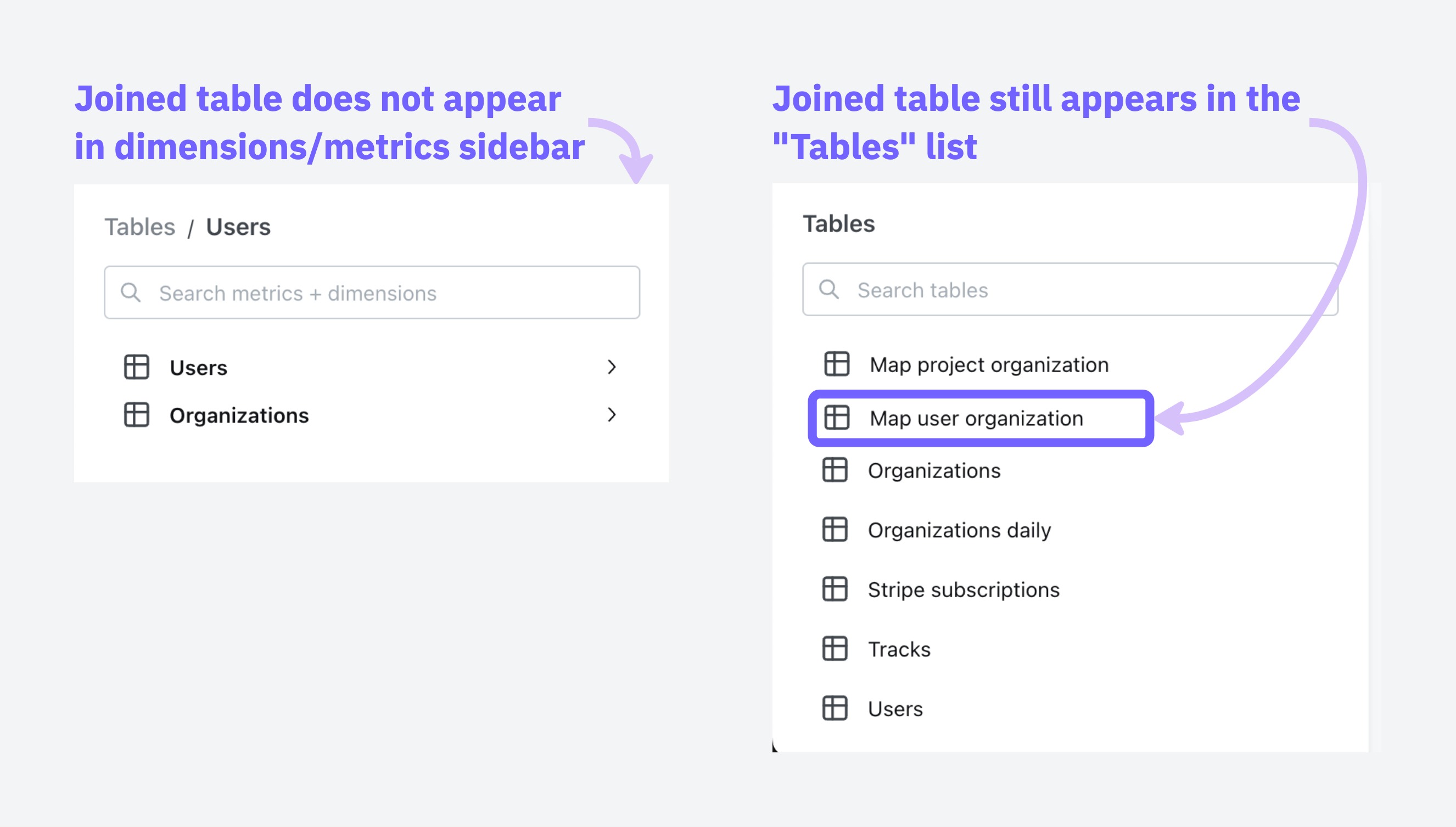
You can adjust which tables show up in the Tables list by adjusting your tables configuration under project settings, [read the guide here](/guides/adding-tables-to-lightdash#configuring-which-tables-appear-in-your-lightdash-project).
## SQL fanouts
When joining tables in SQL, it can accidentally inflate your metrics if those tables have one-to-many relationships. Understanding when this happens helps you know which metrics need special handling.
When dealing with joins that might cause metric inflation, certain types of calculations remain safe to use.
### Safe vs. risky metrics
These metrics stay accurate even when the data contains duplicates:
* **min and max:** `min(order_total)` and `max(order_total)` give you the same answer whether you have duplicates or not, because they're looking for the extreme values, not counting or adding things up. The maximum value in a set doesn't change just because that value appears multiple times.
* **`Aggregate functions with distinct:`** `count(distinct user_id)` ensures each user is counted only once, regardless of how many times they appear in the joined result.
These metrics can give you the wrong answers:
* `sum`, `count`, `avg` without using distinct
* Custom calculations that treat duplicated rows as separate data points
### Common scenarios and what gets affected
**Example:** When you join an `organization` table to a `users` table, each organization can have multiple users.
In this scenario:
✅ **User metrics remain accurate** Since each user appears exactly once in the joined result, any metrics calculated on the user level (like average user age or total user count) will be correct.
❌ **Organization metrics become inflated** - Each organization will appear multiple times in the result set (once for each associated user). This means organization-level metrics will be counted multiple times, leading to inflated results.
For example, if "ABC Corp" has 2 users, its org\_total\_users metric cannot be summed because it will be duplicated twice.
**Raw tables**
`organizations` table
| organization\_id | organization\_name | org\_total\_users |
| :--------------- | :----------------- | :---------------- |
| 1 | ABC Corp | 2 |
| 2 | XYZ Ltd | 3 |
`users` table
| organization\_id | user\_id | user\_age |
| :--------------- | :------- | :-------- |
| 1 | 100 | 57 |
| 1 | 200 | 13 |
| 2 | 300 | 20 |
| 2 | 400 | 30 |
| 2 | 500 | 19 |
**Joined Output**
Organizations are multiplied by the number of users
| user\_id | organization\_id | org\_total\_users | user\_age |
| :------- | :--------------- | :---------------- | :-------- |
| 100 | 1 | 2 | 57 |
| 200 | 1 | 2 | 13 |
| 300 | 2 | 3 | 20 |
| 400 | 2 | 3 | 30 |
| 500 | 2 | 3 | 19 |
We cannot sum org\_total\_users on this joined table because it will be incorrect.
**Example:** When you create a chain of one-to-many relationships by joining `users` to their `orders`, and then `orders` to their support `tickets`.
In this scenario:
✅ **Ticket metrics remain accurate** - The final table (`tickets`) in the chain will have accurate metrics because each ticket appears exactly once in the result set.
❌ **Upstream tables experience compounding inflation** - The further up the chain you go, the worse the inflation gets:
* **Order metrics become inflated** by the number of tickets per order. If Order #1001 has 3 support tickets, any metrics for this order (like order value) will be counted 3 times.
* **User metrics suffer even more inflation** as they're multiplied by the total number of tickets. If a user has 2 orders with 3 tickets each, user-level metrics (like lifetime value) will be counted 6 times in aggregate calculations.
For example, if the user Alice has 2 orders and each of these orders have 3 tickets, after joining `users` → `orders` → `tickets`, the result would look like:
**Raw tables**
`users` table
| user\_id | user\_name | user\_age |
| :------- | :--------- | :-------- |
| 1 | Alice | 23 |
`orders` table
| order\_id | user\_id | order\_total\_items |
| :-------- | :------- | :------------------ |
| 1001 | 1 | 5 |
| 2001 | 1 | 2 |
`tickets` Table
| order\_id | ticket\_id | ticket\_time\_to\_first\_response\_mins |
| :-------- | :--------- | :-------------------------------------- |
| 1001 | A | 8 |
| 1001 | B | 62 |
| 1001 | C | 47 |
| 2001 | D | 5 |
| 2001 | E | 1 |
| 2001 | F | 89 |
**Joined output**
Step 1: First Join users to orders
| user\_name | user\_age | order\_id | order\_total\_items |
| :--------- | :-------- | :-------- | :------------------ |
| Alice | 23 | 1001 | 5 |
| Alice | 23 | 2001 | 2 |
Step 2: Join the result of step 1 to tickets
| user\_name | order\_id | ticket\_id | user\_age | order\_total\_items | ticket\_time\_to\_first\_response\_mins |
| :--------- | :-------- | :--------- | :-------- | :------------------ | :-------------------------------------- |
| Alice | 1001 | A | 23 | 5 | 8 |
| Alice | 1001 | B | 23 | 5 | 62 |
| Alice | 1001 | C | 23 | 5 | 47 |
| Alice | 2001 | D | 23 | 2 | 5 |
| Alice | 2001 | E | 23 | 2 | 1 |
| Alice | 2001 | F | 23 | 2 | 89 |
Note that `users` and `orders` are duplicated but `tickets` are not, which means we can only safely apply aggregates to metrics on the `tickets` table.
**Example:** When you join `users` → `orders` AND `users` → `tickets` (both `orders` and `tickets` relate to `users`, but not directly to each other)
This creates the most problematic data situation, when you join multiple one-to-many relationships that branch from the same table but aren't directly related to each other.
In this scenario:
❌ **EVERY aggregate metric gets inflated due to the cartesian product effect**
* **User metrics become massively inflated** by the product of `orders` × `tickets`. If a user has 5 orders and 10 support tickets, each user-level metric will be counted 50 times!
* **Order metrics get inflated** by the number of tickets the user has.
* **Ticket metrics get inflated** by the number of orders the user has.
For example, if the user Alice has 2 orders and 3 tickets, after joining `users` to both `orders` and `tickets` separately, the result would look like:
**Raw tables**
`users` table
| user\_id | user\_name | user\_credit\_amount |
| :------- | :--------- | :------------------- |
| 1 | Alice | 100 |
`orders` table
| user\_id | order\_id | order\_total\_items |
| :------- | :-------- | :------------------ |
| 1 | 1001 | 5 |
| 1 | 2001 | 2 |
`tickets` Table
| user\_id | ticket\_id | ticket\_time\_to\_first\_response\_mins |
| :------- | :--------- | :-------------------------------------- |
| 1 | A | 8 |
| 1 | B | 62 |
| 1 | C | 47 |
**The cartesian product** - (every record is joined to every other record) of users, orders and tickets.
| user\_name | order\_id | ticket\_id | user\_credit\_amount | order\_total\_items | ticket\_time\_to\_first\_response\_mins |
| :--------- | :-------- | :--------- | :------------------- | :------------------ | :-------------------------------------- |
| Alice | 1001 | A | 100 | 5 | 8 |
| Alice | 1001 | B | 100 | 5 | 62 |
| Alice | 1001 | C | 100 | 5 | 47 |
| Alice | 2001 | A | 100 | 2 | 8 |
| Alice | 2001 | B | 100 | 2 | 62 |
| Alice | 2001 | C | 100 | 2 | 47 |
Note that there is duplication in `users`, `orders` and `tickets` records. We cannot apply aggregates on any metrics without deduplicating records.
This creates the worst-case scenario where no aggregate metric (`sum`, `count`, `avg`) is safe without explicit deduplication techniques.
### Handling fanouts
**Fanout handling is an [early access feature](/references/feature-maturity-levels)** currently only available in Lightdash Cloud. If you would like to use it, [reach out to the Lightdash team](/contact/contact_info).
Lightdash can automatically handle deduplicating metrics that are inflated due to fanouts if join relationships are specified in YAML as described [in Defining join relationships, above](#defining-join-relationships).
**For example:**
```
models:
- name: users
meta:
primary_key: ${user_id}
joins:
- join: organizations
sql_on: ${organizations.organization_id} = ${users.organization_id}
relationship: many-to-one
- join: orders
sql_on: ${users.user_id} = ${orders.user_id}
relationship: one-to-many
```
Specifying a `primary_key` and the join `relationship` allows Lightdash to:
* Understand the **intended row-level granularity**
* Prevent metric inflation by deduplicating joined rows
Once you've included primary keys and a join relationship, Lightdash will add CTEs to the compiled SQL query that ensure metrics are not inflated.
#### How Lightdash solves SQL fanouts
Lightdash uses a pattern of Common Table Expressions (CTEs) to solve the fanout problem. Here's how it works:
1. **cte\_keys**: Contains dimensions (like payment\_method, order\_id) that define the grain of your final results and the primary keys. Any field you want to GROUP BY in your final output should be included here.
2. **cte\_metrics**: Performs calculations on metrics while maintaining the correct grain established by the keys CTE. This prevents double-counting when aggregating across related tables.
3. **cte\_unaffected**: Calculates all metrics that are not affected by fanouts. This includes metrics that exclude duplicates by definition (i.e. `MIN()`, `MAX()` and `COUNT(DISTINCT)`) as well as metrics that are calculated on the table that is on the `many` side of an `one-to-many` or `many-to-one` join relationship. For example, if you have joined `accounts` to `deals` using a `one-to-many` join relationship, `SUM(deals.amount)` would be calculated in this unaffected\_cte because the `deals` data is not susceptible to fanouts.
4. **final**: Join the metrics CTEs together to create the complete result set.
Lightdash creates a separate cte\_keys and cte\_metrics for each table that contains metrics with fanouts. This is why you'll see names like "cte\_keys\_orders" and "cte\_metrics\_orders" in the example below, indicating they're specific to the orders table.
##### Examples
```sql
# Step 1: Create cte_keys that determine the final grain of your results i.e. whatever we will group by.
# Exclude fields that we use in aggregations to calculate metrics e.g. `"orders".amount`
WITH cte_keys_orders AS (
SELECT DISTINCT
"orders".status AS "orders_status", -- grouping dimension
"orders".order_id AS "pk_order_id" -- primary key
FROM "postgres"."jaffle"."payments" AS "payments"
LEFT OUTER JOIN "postgres"."jaffle"."orders" AS "orders"
ON ("orders".order_id) = ("payments".order_id)
),
# Step 2: Calculate metrics that are affected by fanouts
cte_metrics_orders AS (
SELECT
cte_keys_orders."orders_status",
SUM("orders".amount) AS "orders_total_order_amount" -- order metric (affected by fanout)
FROM cte_keys_orders
LEFT JOIN "postgres"."jaffle"."orders" AS "orders" ON cte_keys_orders."pk_order_id" = "orders".order_id -- join with primary keys
GROUP BY 1 -- Note orders_status are grouping dimensions
),
# Step 3: Calculate metrics that are not affected by fanouts
cte_unaffected AS (
SELECT
"orders".status AS "orders_status",
COUNT(DISTINCT "payments".payment_id) AS "payments_unique_payment_count" -- payment metric (NOT affected by fanout)
FROM "postgres"."jaffle"."payments" AS "payments"
LEFT OUTER JOIN "postgres"."jaffle"."orders" AS "orders"
ON ("orders".order_id) = ("payments".order_id)
GROUP BY 1 -- Note orders_status are grouping dimensions
)
# Step 4: Join the metrics CTEs together to create the final result with properly calculated metrics
SELECT
cte_unaffected.*,
cte_metrics_orders."orders_total_order_amount" AS "orders_total_order_amount"
FROM cte_unaffected
INNER JOIN cte_metrics_orders ON (
cte_unaffected."orders_status" = cte_metrics_orders."orders_status" OR ( cte_unaffected."orders_status" IS NULL AND cte_metrics_orders."orders_status" IS NULL )
)
ORDER BY "orders_total_order_amount" DESC
LIMIT 500
```
### Known limitations
There are a few situations where Lightdash doesn't currently handle inflated metrics:
When a metric in one table references a dimension from a joined table, Lightdash's fanout handling may not correctly deduplicate the results.
**Example**
References in metric `sql`
```yaml
metrics:
total_amount:
type: sum
sql: ${amount}+${expenses.amount}
```
Or when the metric is for a dimension that references a dimension from a joined table.
```
models:
- name: test
columns:
- name: start_time
...
additional_dimensions:
duration_minutes:
type: number
sql: DATEDIFF('minutes', ${start_time}, ${user_test_score.calculated_at})
metrics:
average_duration:
type: AVG
```
**Recommendation**
To avoid this limitation, consider moving this logic to your dbt models. By transforming your data in dbt first, you can pre-calculate these dimensions without needing to reference dimensions from joined tables in Lightdash.
Metrics that include filters based on dimensions from joined tables can also cause issues with Lightdash's fanout handling.
**Example**
```yaml
metrics:
count_users:
type: count_distinct
filters:
- web_sessions.is_bot_user: false
```
**Recommendation**
To avoid this limitation, consider moving this logic to your dbt models. By applying these filters in your dbt transformations, you can create pre-filtered metrics that don't require referencing dimensions from joined tables in Lightdash.
Metrics that involve multiple levels of references or dependencies can be particularly challenging for Lightdash's fanout handling.
**Example**
```yaml
# orders.yml
metrics:
total_amount:
type: number
sql: ${amount}+${expenses.total_amount}
# expenses.yml
metrics:
total_amount:
type: number
sql: ${amount}+${tariffs.amount}
```
**Recommendation**
To avoid this limitation, consider moving this complex logic to your dbt models. By pre-calculating these metrics in dbt, you can flatten the dependency chain and avoid the need for multi-level references between joined tables in Lightdash.
Rolledup metrics are pre-aggregated metrics that have already been calculated at a specific granularity in your data warehouse. When these metrics are used in queries that involve joins creating fanouts, they can become inflated because the pre-aggregated values get duplicated across the fanned-out rows.
**Example: Orders and payments analysis**
Consider a scenario where you have an orders table with total\_amount and a payments table with payment methods. For each order, you can have multiple payments with different methods:
**orders table:**
| order\_id | total\_amount |
| :-------- | :------------ |
| 1001 | 100.00 |
| 1002 | 250.00 |
**payments table:**
| payment\_id | order\_id | payment\_method | amount |
| :---------- | :-------- | :-------------- | :----- |
| 1 | 1001 | cash | 60.00 |
| 2 | 1001 | card | 40.00 |
| 3 | 1002 | card | 250.00 |
If you select payment method and average orders total\_amount, the results are wrong because total\_amount is a rolledup metric that can't be split by method:
| payment\_method | avg\_order\_total |
| :-------------- | :---------------- |
| cash | 100.00 |
| card | 175.00 |
This is incorrect because:
* The cash average should reflect that cash was only used for part of order 1001 (\$100), but the query shows \$100 as if cash paid for the entire order
* The card average shows \$175 (average of \$100 and \$250), but this doesn't represent the actual relationship between card payments and order totals
The issue is that `total_amount` is a rolledup metric at the order level, but when joined with payments, it gets duplicated across payment methods, making it impossible to correctly analyze the relationship between payment methods and order totals.
**Best practices for rolledup metrics**
To avoid issues with rolledup metrics in joins that create fanouts:
* **Avoid rolledup metrics when possible:** Instead of using pre-aggregated values, use the underlying detail-level data. For example, instead of using a pre-calculated `total_amount` at the order level, use individual payment amounts that can be properly aggregated.
* **Name rolledup metrics clearly:** If you must use rolledup metrics, give them descriptive names that indicate their pre-aggregated nature and limitations.
* **Provide clear descriptions:** Always include detailed descriptions in your dbt model's YAML that explain the metric's granularity and any limitations when used with joins.
```yaml
models:
- name: orders
columns:
- name: total_amount
meta:
metrics:
total_order_amount:
type: sum
description: 'Pre-aggregated total amount per order. Cannot be meaningfully split by payment method or other transaction-level dimensions.'
```
In some business scenarios, fanouts are actually desired and represent real data relationships. A common example is when you need to calculate per-user fees or charges.
**Example: Per-user billing**
Consider a scenario with accounts, users, and per-user fees where different accounts pay different rates:
**accounts table:**
| account\_id | account\_name |
| :---------- | :------------ |
| 1 | TechCorp |
| 2 | StartupXYZ |
**users table:**
| user\_id | account\_id | user\_name |
| :------- | :---------- | :--------- |
| 101 | 1 | Alice |
| 102 | 1 | Bob |
| 201 | 2 | David |
**fees table:**
| account\_id | fee\_type | per\_user\_amount |
| :---------- | :----------- | :---------------- |
| 1 | Support Fee | 80.00 |
| 1 | Training Fee | 120.00 |
| 2 | Support Fee | 50.00 |
| 2 | Training Fee | 75.00 |
When you join these tables:
```sql
SELECT
a.account_name,
u.user_name,
f.fee_type,
f.per_user_amount
FROM
accounts a
LEFT JOIN users u ON a.account_id = u.account_id
LEFT JOIN fees f ON a.account_id = f.account_id;
```
The resulting fanout is exactly what you want for billing:
| account\_name | user\_name | fee\_type | per\_user\_amount |
| :------------ | :--------- | :----------- | :---------------- |
| TechCorp | Alice | Support Fee | 80.00 |
| TechCorp | Alice | Training Fee | 120.00 |
| TechCorp | Bob | Support Fee | 80.00 |
| TechCorp | Bob | Training Fee | 120.00 |
| StartupXYZ | David | Support Fee | 50.00 |
| StartupXYZ | David | Training Fee | 75.00 |
In this case, each row represents a real charge, and the total billing (TechCorp pays \$400, StartupXYZ pays \$125) is correctly calculated by summing all rows.
**Handling intentional fanouts**
Lightdash does not currently provide a built-in way to explicitly handle intentional fanouts. Using intentional fanouts can cause issues when defining other table relationships and may conflict with Lightdash's automatic fanout handling.
We recommend always use fanout protection for joins. When you actually want a fanout (like per-user billing), create a dedicated dbt model that handles the logic and gets your data to the right granularity first. Then use that model in Lightdash.