> ## Documentation Index
> Fetch the complete documentation index at: https://lightdash-docs-many-to-many.mintlify.site/llms.txt
> Use this file to discover all available pages before exploring further.
# Personal access tokens
You can create a personal access token (PAT) to authenticate in the [CLI](/get-started/setup-lightdash/get-project-lightdash-ready) or with the API.
## Creating a personal access token
To create a personal access token, head to the project settings, then to `personal access tokens`, then click `generate token`.
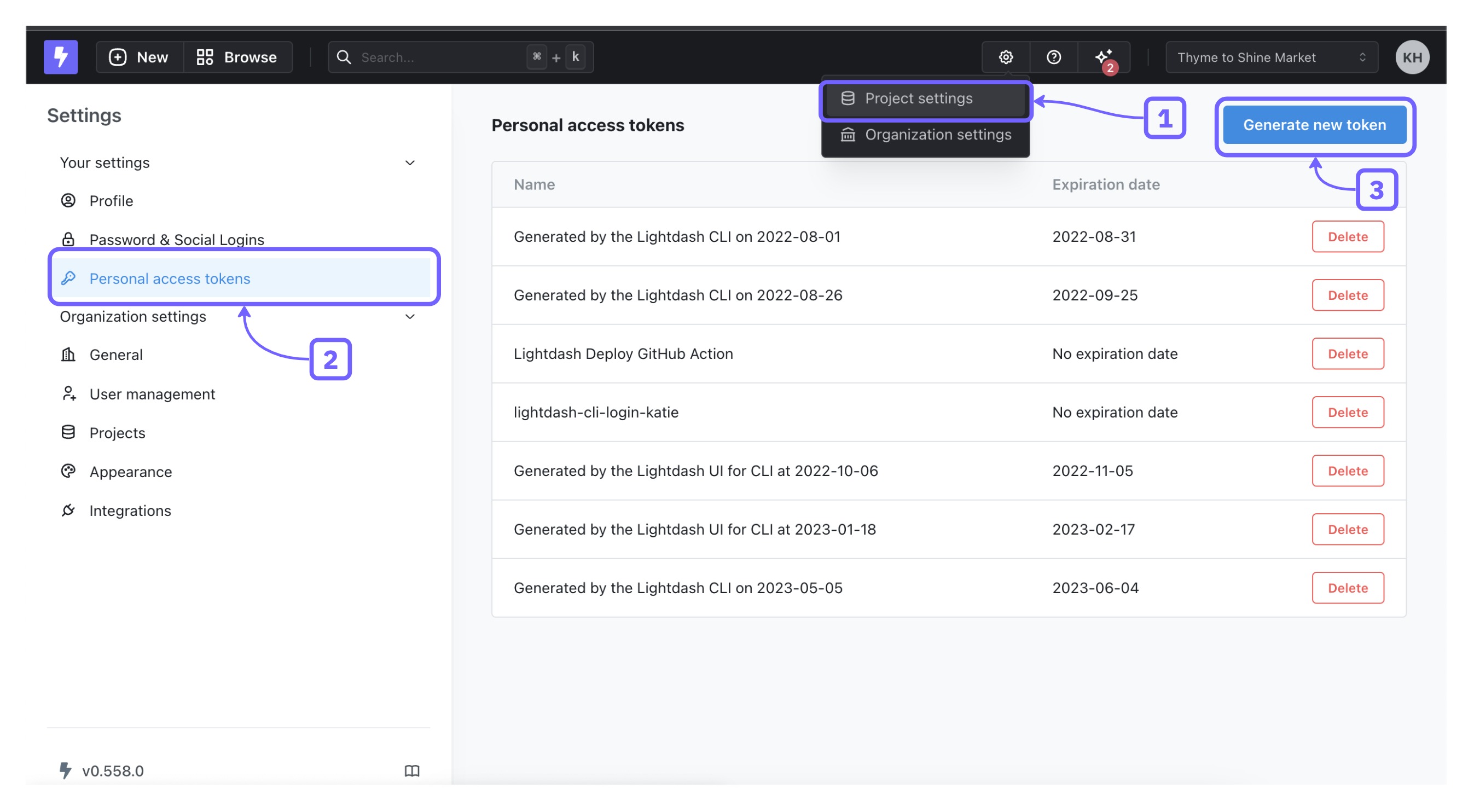 Everybody in your organization can create a personal access token (PAT). To provide additional security, we highly recommend adding an expiration to your personal access tokens.
### How to authenticate
Note that not all endpoints in the API will be accessible with PAT authentication.
The PAT authentication is done via the HTTP Authorization request header.
```bash
Authorization: ApiKey
```
Examples:
```bash
curl --location --request GET 'https://my.lightdash.com/api/v1/org/projects' \
--header 'Authorization: ApiKey eeaa81d8bcd89a770bd8a581cabd052b'
```
```bash
GET /api/v1/org/projects HTTP/1.1
Host: my.lightdash.com
Authorization: ApiKey eeaa81d8bcd89a770bd8a581cabd052b
```
## Rotating a personal access token
To maintain security, you may want to rotate your personal access tokens periodically. Follow these steps to rotate an existing token.
Requirements for Rotation
* **Token UUID**: To rotate a token, you’ll need its unique identifier (UUID), which you can find on the tokens page in your account settings.
* **Expiration Date**: You must specify a new expiration date when rotating a token. Tokens without an expiration cannot be rotated.
* **Time Interval**: Tokens can only be rotated once per hour.
Use the following curl command to rotate a personal access token. Replace `` with the UUID of the token you wish to rotate, and `` with your current token.
```bash
curl --location --request PATCH 'https://my.lightdash.com/api/v1/user/me/personal-access-tokens//rotate' \
--header 'Content-Type: application/json' \
--header 'Authorization: ApiKey ' \
--data '{
"expiresAt": "2025-12-13T16:10:04.976Z"
}'
```
This process will invalidate the previous token and return a new token with the specified expiration date.
Everybody in your organization can create a personal access token (PAT). To provide additional security, we highly recommend adding an expiration to your personal access tokens.
### How to authenticate
Note that not all endpoints in the API will be accessible with PAT authentication.
The PAT authentication is done via the HTTP Authorization request header.
```bash
Authorization: ApiKey
```
Examples:
```bash
curl --location --request GET 'https://my.lightdash.com/api/v1/org/projects' \
--header 'Authorization: ApiKey eeaa81d8bcd89a770bd8a581cabd052b'
```
```bash
GET /api/v1/org/projects HTTP/1.1
Host: my.lightdash.com
Authorization: ApiKey eeaa81d8bcd89a770bd8a581cabd052b
```
## Rotating a personal access token
To maintain security, you may want to rotate your personal access tokens periodically. Follow these steps to rotate an existing token.
Requirements for Rotation
* **Token UUID**: To rotate a token, you’ll need its unique identifier (UUID), which you can find on the tokens page in your account settings.
* **Expiration Date**: You must specify a new expiration date when rotating a token. Tokens without an expiration cannot be rotated.
* **Time Interval**: Tokens can only be rotated once per hour.
Use the following curl command to rotate a personal access token. Replace `` with the UUID of the token you wish to rotate, and `` with your current token.
```bash
curl --location --request PATCH 'https://my.lightdash.com/api/v1/user/me/personal-access-tokens//rotate' \
--header 'Content-Type: application/json' \
--header 'Authorization: ApiKey ' \
--data '{
"expiresAt": "2025-12-13T16:10:04.976Z"
}'
```
This process will invalidate the previous token and return a new token with the specified expiration date.